Knowledge Base

support@ssttiming.com     1-855-794-6778
Superior Swim Timing
A solução de tempo acessível e com recursos completos
  • Home
  • Software de cronometragem
    • Característicos
    • Placar móvel
    • Capturas de tela
    • Software Version 7
    • Downloads de software
  • Atlantis Starter
  • Botões e cabos
  • Interface de Pad
    • Especificações técnicas
  • Preços
  • Sobre nós
    • News
    • Contate-Nos
    • Nossos usuários
    • Política de Privacidade
  • Languages

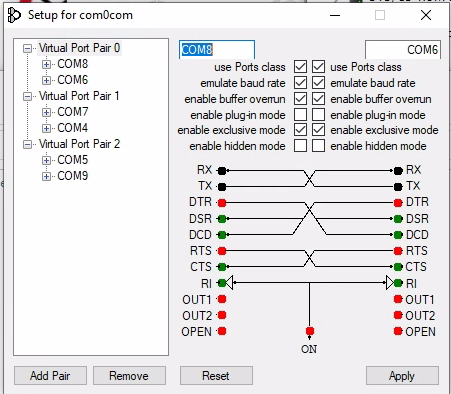
SST will not start up when you are using com0com software.

A

SST will not start up when you are using com0com software.

  1. Your application can hang-up because receive buffer overrun is disabled by

default. You can fix the problem by enabling receive buffer overrun for the

receiving port. Also, to prevent some flow control issues you need to enable

baud rate emulation for the sending port.
 

Share
Category: Installing the SST software
Permalink
Share
On September 15, 2020   /    
Email Newsletter icon, E-mail Newsletter icon, Email List icon, E-mail List icon Sign up for our Email Newsletter
For Email Marketing you can trust
The best part of what we do? The people. 💙This holiday season, we want to say THANK YOU to our amazing customers and friends for another incredible year with Superior Swim Timing. We’re so grateful for your support, your trust, and your community.Merry Christmas and cheers to an exciting year ahead! 🎄✨ ... See MoreSee Less

Photo

View on Facebook
· Share

Share on Facebook Share on Twitter Share on Linked In Share by Email

From all of us at SST, have a warm and joyful Thanksgiving! 🦃🍁✨ ... See MoreSee Less

Photo

View on Facebook
· Share

Share on Facebook Share on Twitter Share on Linked In Share by Email

🎆🎉 Happy Birthday, America! 🇺🇸Here’s to fireworks, family, freedom, and the red, white and blue! ❤️🤍💙#FourthOfJuly #IndependenceDay #HappyBirthdayAmerica #USA249 ... See MoreSee Less

Photo

View on Facebook
· Share

Share on Facebook Share on Twitter Share on Linked In Share by Email

Installing the SST software

a

Font Too Small With Windows 10

If you have a high resolution monitor and are running Windows 10 you will sometimes have an issue with the font of SST being to small.  If this happens navigate to the following directory using Windows file explorer “c:\Program Files\Superior Swim Timing\SST Timer”.  Next, left click and then right click on “SST 64.exe” and left click on “Properties”.  Click on the “Compatibility” tab and then click on “Change high DPI settings”.  Check the box for “Override high DPI scaling behavior”.  For the Application, select “System”.  Click “OK” to exit the properties box and apply changes.

Share
Category: Installing the SST software
Permalink
a

SST will not start up when you are using com0com software.

  1. Your application can hang-up because receive buffer overrun is disabled by

default. You can fix the problem by enabling receive buffer overrun for the

receiving port. Also, to prevent some flow control issues you need to enable

baud rate emulation for the sending port.


Share
Category: Installing the SST software
Permalink
a

When I start SST I receive a Java error.

This means that you need to install the 64 bit version of Java.  Follow this link:  http://www.java.com/en/download/manual.jsp

Next click on:  “Windows Offline (64-bit)” and follow the prompts to install Java.

If you still receive the error, go into “Programs and features” from the Control Panel on your computer and uninstall the 32 bit version of Java.

Make sure you restart you computer after uninstalling the 32 bit version.

Share
Category: Installing the SST software
Permalink
© 2021 South America SST - Superior Swim Timing | Privacy Policy | login
Back to Top
This site uses cookies. By continuing to use this website, you agree to their use. To find out more, including how to control cookies, please see here: Read More CLOSE
Privacy & Cookies Policy

Privacy Overview

This website uses cookies to improve your experience while you navigate through the website. Out of these, the cookies that are categorized as necessary are stored on your browser as they are essential for the working of basic functionalities of the website. We also use third-party cookies that help us analyze and understand how you use this website. These cookies will be stored in your browser only with your consent. You also have the option to opt-out of these cookies. But opting out of some of these cookies may affect your browsing experience.
Necessary
Always Enabled
Necessary cookies are absolutely essential for the website to function properly. This category only includes cookies that ensures basic functionalities and security features of the website. These cookies do not store any personal information.
Non-necessary
Any cookies that may not be particularly necessary for the website to function and is used specifically to collect user personal data via analytics, ads, other embedded contents are termed as non-necessary cookies. It is mandatory to procure user consent prior to running these cookies on your website.
SAVE & ACCEPT
en_USEnglish
es_ARSpanish en_USEnglish